

BATTLEPASS 3.0

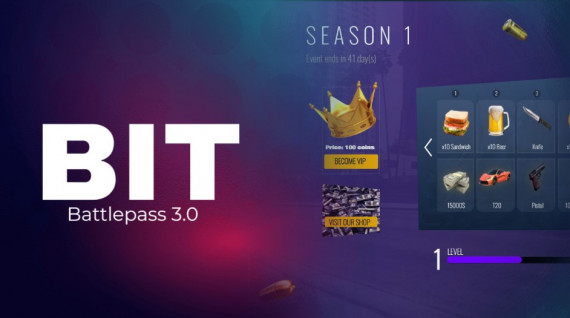
Battlepass 3.0 - Compatible with ESX, QB and QBOX
🎮 Create a Fully Configurable Battle Pass for Your FiveM Server
Encourage your players to stay active and engaged with a battle pass system that offers exciting rewards and progression! This modern and responsive script is designed to keep your community motivated with endless possibilities.
✨ Key Features:
- 🎨 Modern Design: Clean and stylish interface that enhances the user experience.
- 📆 Seasonal System: Create seasons and display the time remaining until the season ends.
- 🔗 Shortcuts: Add direct links to your webshop or Discord server for seamless integration.
- 📱 Responsive Design: Fully optimized for any screen size, offering accessibility across devices.
🛠️ Commands:
/bp- Access the battle pass panel/addcoins ID COINS- Add coins to a user by ID/checkcoins ID- Check a user's coin balance by ID/delcoins ID COINS- Remove coins from a user by ID/addxp ID XP- Add experience points to a user/delxp ID XP- Remove experience points from a user/delVIP ID- Remove VIP status from a user
✨ Configurable Triggers:
Award XP points for jobs or other actions with a simple server event trigger:
TriggerServerEvent("battlepass:addXP", GetPlayerServerId(PlayerId()), 100) -- 100 is the amount of points
⚙️ Fully Customizable:
- Levels and Rewards: Configure levels, XP requirements, and rewards (items, weapons, money, or VIP-only perks) in the
config.luafile. - VIP Benefits: Set the price for VIP access and customize exclusive rewards.
- HTML & CSS: Personalize the appearance to align with your server's theme.
🎁 Automatic Rewards:
Players earn XP for time spent on the server or completing actions. As they level up, they unlock rewards automatically. Compatible with Core_credits, allowing users to purchase the first 25 levels (similar to Fortnite).
🔥 Take your server to the next level with this fully configurable battle pass system. Boost player engagement and offer an exciting progression system tailored to your community!
Installation
Remember that you will find the installation documentation in the documentation: https://docs.bit-scripts.com
Support
If you have any questions about the installation of a script or how it works, you can contact us through Discord by opening a ticket. Or you can send an email to the support address that appears after the purchase.